The true cost of a smartphone is not its sticker price, but the hidden taxes on repairs and forced upgrades that come later.
- Polymer-backed phones like the Nokia G-Series are up to 3x cheaper to repair than fragile glass-backed flagship models.
- Guaranteed multi-year software updates prevent the ‘software obsolescence’ that forces you to buy a new phone when your old one still works perfectly.
Recommendation: For a UK family, choosing a phone based on ‘Total Cost of Ownership’ rather than chasing the latest specs is a pragmatic financial decision that can easily save over £150 per year.
For years, the smartphone industry has sold us a simple story: upgrade every two years for the latest features. As a pragmatic tech reviewer, I see the reality for UK families is far different. It’s a cycle of expensive contracts, fragile devices that shatter from a single drop, and the constant worry of a cracked screen. The real conversation shouldn’t be about megahertz or megapixels, but about financial resilience. It’s about choosing technology that withstands the chaos of a school run, a rainy football match, and the occasional accidental trip through the washing machine.
The standard advice revolves around finding the cheapest upfront deal or the phone with the longest list of specifications. But what if the smartest financial move isn’t chasing the lowest price, but the lowest *total cost of ownership*? This means factoring in the inevitable costs of repair, the frustration of a slowing device, and the forced expense of an upgrade when security updates run out. It’s a shift in mindset from short-term appeal to long-term value.
This article dissects this very principle. We’ll move beyond the marketing hype to analyse the pragmatic, and often overlooked, financial benefits of choosing a durable, repairable phone like the Nokia G-Series. We’ll quantify the savings, demystify the technology behind its resilience, and provide actionable advice to protect your investment. This isn’t about fetishizing specs; it’s about making a sound financial choice for your family.
This guide breaks down the true cost of phone ownership for a UK family. From hidden contract fees to the science of screen protectors, we’ll explore how a pragmatic choice can lead to significant annual savings.
Summary: Unlocking the Real Value in Your Next Family Phone
- Why upgrading every 2 years is costing you a fortune in hidden fees?
- How to set up a Nokia G-Series for a child’s first phone without stress?
- Nokia G-Series vs Budget Rivals: Which one survives the washing machine test?
- The screen protector myth that leaves 40% of displays vulnerable to cracks
- When to clear the cache: the 3 signs your storage is affecting speed
- Why glass-backed phones cost 3x more to repair than polymer ones?
- When is the optimal time to charge to preserve long-term battery health?
- Polymer vs Glass Shells: Which Material Survives a 2-Metre Drop onto Concrete?
Why upgrading every 2 years is costing you a fortune in hidden fees?
The two-year upgrade cycle feels like a natural part of modern life, but it’s a carefully engineered system designed to keep you paying. The most significant expense isn’t the phone itself, but the bundled contract that masks its true cost. Once your 24-month contract ends, many people continue paying the same high monthly fee, even though the handset portion is paid off. This overpayment can be substantial; according to UK mobile comparison data, switching to a far cheaper SIM-only deal after your contract ends can save an average of £304 per year. That’s money that could be sitting in your bank account instead of your network provider’s.
Beyond this, there are the infamous mid-contract price rises. Often buried in the small print, these allow providers to increase your bill in line with inflation (plus a bit extra), regardless of the price you signed up for. Over a 24-month period, this penalty adds up. In fact, research from Which? reveals this can cost customers an extra £120 over the lifetime of their contract. By holding onto a durable phone for three, four, or even five years, you break free from this cycle. You can leverage the highly competitive SIM-only market and avoid paying for a new handset you don’t truly need, maximising your financial resilience.
How to set up a Nokia G-Series for a child’s first phone without stress?
Giving a child their first phone is a major milestone, mixing excitement with parental anxiety. The focus shouldn’t just be on the device, but on the digital ecosystem you build around it. The key is to transform it from a potential source of conflict into a teaching moment about responsibility, value, and online safety. A durable phone like a Nokia G-Series is the perfect hardware for this lesson, as its lower replacement cost reduces the financial sting of an inevitable accident. This setup is less about locking down the device and more about opening a dialogue with your child.
The process starts with Google Family Link, a free and powerful tool. Before handing over the phone, use it to establish clear boundaries. This includes setting spending limits that are realistic and educational. With the average UK child’s weekly pocket money at £9.23, setting a small weekly budget for the Play Store teaches them the value of money in a digital world. This isn’t about restriction; it’s about financial literacy. It’s also crucial to block in-app purchases by default and restrict app downloads to their age rating, preventing surprise bills and exposure to inappropriate content.

This technical setup should be paired with a human contract. Setting screen time limits and establishing ‘no-phone zones’ like bedrooms or the dinner table helps build healthy habits. The most effective approach is to make this a collaborative process, creating a sense of shared ownership and trust that software alone cannot provide.
Your First Phone Onboarding Plan
- Configure Google Family Link: Align spending limits with a realistic weekly pocket money budget (e.g., £8-9) to teach digital financial literacy.
- Enable Parental Controls: Block all in-app purchases by default and restrict app store downloads to age-appropriate content only.
- Establish Boundaries: Use Family Link to set daily screen time limits and agree on physical ‘no-phone zones’ such as bedrooms and during mealtimes.
- Create a ‘First Phone Contract’: Draft a simple written agreement outlining responsibilities for device care, expectations for online behaviour, and consequences for misuse.
- Introduce the ‘Hand-Me-Down’ Plan: Explain that this durable phone is the first step in a lifecycle, teaching long-term value and the concept of earning a future upgrade through responsible use.
Nokia G-Series vs Budget Rivals: Which one survives the washing machine test?
While we don’t recommend putting your phone in the laundry, the “washing machine test” is a metaphor for the unpredictable chaos of family life. The real question is: which phone offers better software survival and a lower total cost of ownership when things go wrong? Many budget phones look good on paper but cut corners on two critical, invisible factors: software support and repairability. A phone that stops receiving security updates within 18 months becomes a digital zombie, insecure and incompatible with essential apps like banking, forcing a costly upgrade.
Case Study: The ‘Software Survival’ Advantage
The Nokia G-Series exemplifies software longevity as a critical survival metric. The G60 5G, for instance, launched with a promise of three years of security updates and major Android version upgrades. This extended software support timeline ensures the device remains compatible with banking apps, secure messaging platforms, and essential services long after budget rivals become obsolete. In contrast, many competing budget devices from lesser-known brands cease receiving security patches within 12-18 months, rendering them vulnerable and eventually unusable for critical applications. This ‘software survival’ translates to real cost savings, as users avoid forced upgrades due to security obsolescence—a hidden cost often overlooked in traditional durability comparisons.
The second factor is the “repairability dividend”—the money you save when a cracked screen doesn’t write off the entire device. Phones with polymer backs and readily available parts, like the Nokia G-Series, are significantly cheaper and faster to repair than their fragile, glass-backed competitors. This isn’t just a minor difference; it’s a fundamental shift in the cost of ownership, as demonstrated by data from UK repair specialists.
| Phone Model Category | Average UK Screen Repair Cost | Typical Turnaround Time | Availability of Parts |
|---|---|---|---|
| Budget Nokia/Similar Polymer Phones | £60 – £80 | Same day – 24 hours | Widely available |
| Mid-Range Android (Samsung A-Series) | £120 – £180 | 1-2 days | Common |
| Flagship Glass-Back Phones | £215 – £320 | 2-3 days | OEM parts required |
| UK Market Average (All Models) | £215 | 1-3 days | Varies by model |
| Source: PhoneMend UK Repair Partners Survey. Budget polymer-backed phones typically cost 60-70% less to repair than flagship glass models. | |||
The screen protector myth that leaves 40% of displays vulnerable to cracks
There’s a pervasive myth that any screen protector is better than no screen protector. This false sense of security is a costly one. In reality, a cheap, poorly designed protector does little more than prevent superficial scratches. It offers almost no protection against the impacts that actually crack screens, leaving your expensive display dangerously exposed. The difference between an effective protector and a useless one lies in understanding the physics of an impact.
A quality tempered glass screen protector isn’t just a piece of plastic; it’s a sacrificial energy-dissipating layer. Its job is to absorb and spread the force of a drop across its own surface, shattering itself to save the much more expensive phone screen underneath. As professional UK phone repair technicians explain, modern phones use laminated OLED or LCD panels where the glass and the electronic digitizer are a single, costly unit. A cheap protector that cracks without absorbing energy has failed its one true job, transferring the entire impact force directly to this fragile component.
The Danger of ‘Edge-Gap Vulnerability’
Professional UK phone repair technicians explain that the most common point of failure is the curved edges of modern phone screens, often referred to as 2.5D glass. It’s estimated that 70% of impact damage occurs at these vulnerable points. Many budget screen protectors are cut flat and fail to cover these curves, creating a critical “edge-gap vulnerability”. When the phone is dropped, the impact lands directly on the exposed glass edge, bypassing the protector entirely. This is why so many people find their screen has cracked despite having a protector installed. True protection comes from a system: a full, edge-to-edge tempered glass protector paired with a case that has a raised lip to shield those corners. Aesthetic-only protection provides nothing but false security.
Investing £15-£25 in a high-quality, edge-to-edge tempered glass protector from a reputable brand is not an expense; it’s insurance. It’s a small, one-time cost that prevents a £80-£300 repair bill down the line. When paired with a durable phone like a Nokia G-Series, it creates a robust system built for long-term value, not just for looks.
When to clear the cache: the 3 signs your storage is affecting speed
One of the most common frustrations with any phone, regardless of price, is when it starts to feel sluggish. Before you assume the device is simply “old” and needs replacing, the culprit is often something much simpler: a cluttered cache. The cache is temporary data stored by apps to help them load faster. While useful, it can accumulate over time, consuming storage and, ironically, slowing your phone down. Knowing when and how to clear it is a key piece of long-term maintenance that costs nothing and can dramatically improve performance.
You don’t need to clear your cache daily. In fact, doing so can be counterproductive. Instead, look for these three specific diagnostic signs that indicate your phone’s performance is being impacted by its temporary files. Each sign points to a different type of cache issue and requires a slightly different approach to fix it. This is not a complex technical task; it’s a simple piece of digital housekeeping that anyone can perform in a few seconds.
Here are the three key indicators that it’s time for a cache clear:
- Sign 1 – App-Specific Lag: A single, frequently used app like Facebook, Instagram, or TikTok becomes slow and unresponsive, while the rest of the phone runs perfectly fine. This points to a bloated cache within that specific app. The remedy is to navigate to Settings > Apps > [Select the problematic app] > Storage > and tap ‘Clear Cache’. Be careful not to tap ‘Clear Data’, as this will erase your logins and settings.
- Sign 2 – Phantom Storage: Your phone warns you that storage is critically low (e.g., under 10% free), but when you check your Photos, Videos, and Downloads folders, they are nearly empty. This is often caused by streaming apps like Spotify, Netflix, or YouTube, which can accumulate gigabytes of invisible cached data. The fix is to check Settings > Storage > Cached Data and perform a system-wide clear, or target the streaming apps individually.
- Sign 3 – Stuttering Scroll: The once-smooth experience of scrolling through a social media feed or a long webpage becomes jerky and laggy. This often happens after the phone has been running for many days without a restart, as the system struggles to manage UI elements stored in RAM. The first step is always to restart the phone. If the problem persists, then perform a cache clear on the apps where you notice the stuttering.
By learning to spot these signs, you can keep your device feeling fast and responsive for longer, pushing back the day you feel the need for a costly upgrade. This is a core tenet of pragmatic tech ownership.
Why glass-backed phones cost 3x more to repair than polymer ones?
The sleek, premium feel of a glass-backed phone comes with a hefty, hidden price tag: fragility. While aesthetically pleasing, glass is fundamentally the wrong material for a device that lives in our pockets and is prone to being dropped. The real-world consequence is a repair bill that can be shockingly high. In fact, UK repair shop data confirms that on average, fixing a shattered back on a glass-sandwich phone can have up to 3x higher repair costs for glass-backed models compared to their polymer counterparts.
The reason for this dramatic cost difference isn’t just the material itself. It’s about the complexity and labour involved in the repair. A polymer back is a simple, durable, and inexpensive piece of plastic that can often be easily unclipped and replaced. A glass back is a different story entirely. It’s often glued down and requires special tools and heat to remove, a delicate process that carries a high risk of damaging other internal components.
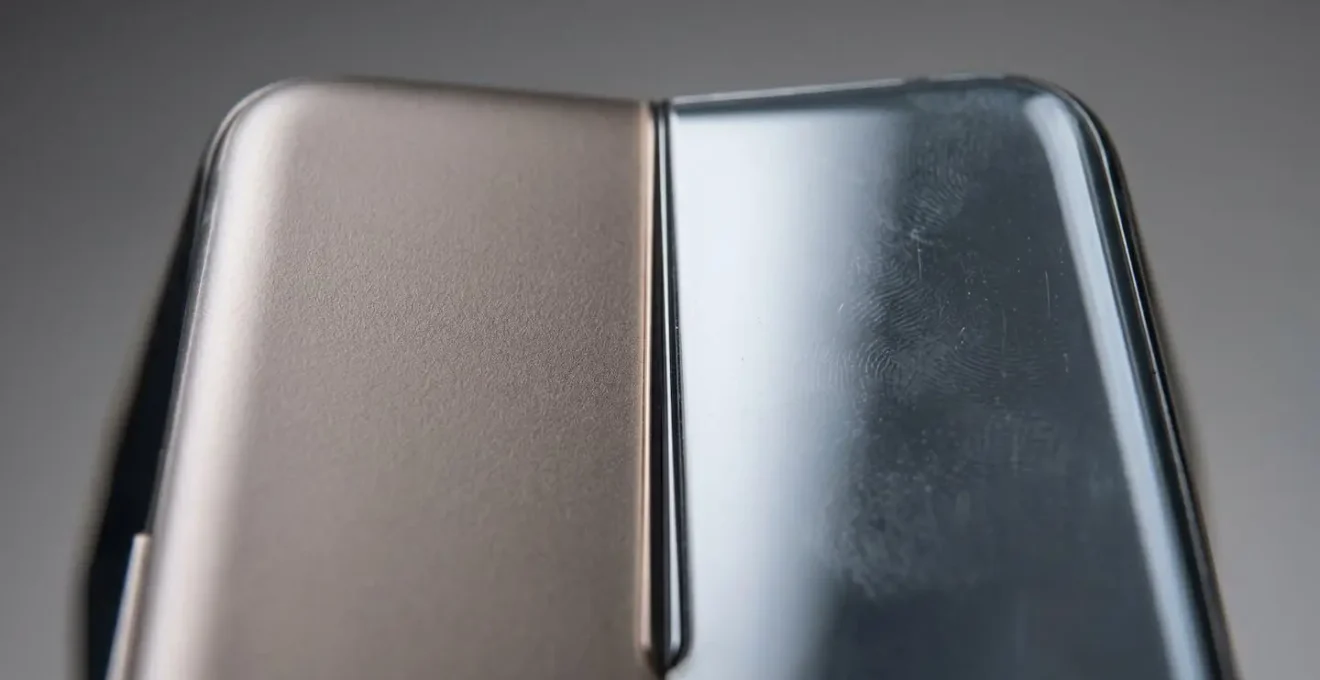
This is where the pragmatic design of phones like the Nokia G-Series shines. By opting for a tough, textured polymer shell, they are not just more resilient to drops in the first place, but they are also designed for a lower total cost of ownership. The choice of material is a deliberate statement about prioritizing real-world durability over showroom appeal.
While the glass part itself might be inexpensive, the labour cost skyrockets because the entire phone often needs to be disassembled from the back, risking damage to other components like wireless charging coils. When you drop a glass sandwich phone, you risk breaking both the front and the back, potentially leading to two separate, expensive repairs from a single incident.
– UK Independent Phone Repair Technicians (Composite), PhoneMend UK Repair Partners Survey Findings
When is the optimal time to charge to preserve long-term battery health?
A phone that doesn’t hold a charge is one of the quickest routes to a forced, and often premature, upgrade. Maximising your phone’s battery lifespan is one of the most effective ways to increase its long-term value, and it requires unlearning some common myths. The goal is to minimise stress on the lithium-ion cells, and the two biggest stressors are extreme charge levels (very high or very low) and, most importantly, heat. Adopting a few evidence-based charging habits can add years to your battery’s effective life.
The single most damaging habit is charging your phone overnight, every night. While modern phones like the Nokia G-Series have circuits to prevent “overcharging,” the real damage comes from two other factors. Firstly, the process of charging generates heat. Secondly, holding the battery at a 100% state of charge for hours on end puts the cells under maximum electrochemical stress. It’s like holding a rubber band fully stretched for eight hours; it will eventually lose its elasticity. The combination of sustained heat and high-voltage stress is the primary accelerator of battery degradation.
The ideal strategy is to practice “snack charging” throughout the day and to follow a few simple rules to minimise stress and heat:
- Rule 1 – The 20-80 Window: The sweet spot for lithium-ion battery health is to keep the charge level between 20% and 80% as much as practically possible. Avoid letting it drain completely to 0% and avoid charging it to 100% and leaving it there. The 20-80 range minimises stress at both ends of the spectrum.
- Rule 2 – Heat is the Enemy: Temperature is more damaging to a battery than its charge level. Always remove the phone from its case when charging to allow heat to dissipate. Never leave it charging on a sunny windowsill, in a hot car, or while running intensive applications like gaming or GPS navigation, as this combination is a recipe for accelerated degradation.
- Rule 3 – Rethink Overnight Charging: If you must charge overnight, use your phone’s built-in ‘Optimized Charging’ or ‘Adaptive Charging’ feature. This charges the battery to 80% quickly and then delays the final 20% until just before your usual wake-up time, drastically reducing the time it spends at the high-stress 100% state.
Key takeaways
- The true cost of a phone includes repairs and forced upgrades, not just the initial price.
- Choosing durable materials like polymer over glass can reduce screen repair costs by up to 70%.
- Long-term software support is critical for security and prevents a phone from becoming prematurely obsolete, saving you from a forced upgrade.
Polymer vs Glass Shells: Which Material Survives a 2-Metre Drop onto Concrete?
In a controlled lab, a glass phone might look pristine. But in the real world of pavements, kitchen floors, and school playgrounds, physics is unforgiving. When a phone is dropped, its survival is determined by one simple factor: how effectively can it manage impact energy? This is where the material science of a polymer shell demonstrates its overwhelming superiority over glass for a device intended for daily use. A drop from a significant height, like two metres onto concrete, is a catastrophic event for a glass phone, but a manageable one for a well-designed polymer device.
Glass is a rigid, brittle material. When it experiences a sharp impact, it has no way to dissipate the energy. The force is concentrated at the point of impact, exceeding the material’s structural integrity and causing it to shatter. This isn’t a design flaw; it’s the fundamental nature of glass. Polymer (or polycarbonate), on the other hand, is a viscoelastic material. This means it has the ability to flex and deform under stress. When a polymer-backed phone hits the ground, the shell absorbs a significant portion of the impact energy by momentarily deforming, then returning to its original shape. This “cushioning” effect protects the delicate internal components and, crucially, the screen.
This physical resilience has a direct and significant financial benefit. A cracked screen or back doesn’t just look bad; it decimates the device’s resale or trade-in value. In fact, phone depreciation analysis reveals that a single crack can cause a 30-50% value reduction. By choosing a device that is inherently more likely to survive a drop intact, you are not only avoiding an immediate repair bill but also preserving the future value of your asset. This is the essence of a pragmatic tech investment—one that pays a “repairability dividend” by simply not breaking in the first place.
By shifting your focus from chasing the latest specifications to prioritising the total cost of ownership, you can make a smarter, more sustainable choice for your family. Adopting a pragmatic approach by selecting a durable, repairable device with long-term software support is the most effective way to save money in the long run.