Accessories & Peripherals
Your smartphone is an impressive piece of technology on its own, but it’s the ecosystem of accessories and peripherals that truly unlocks its potential as a professional tool. Think of your mobile device as a Swiss Army knife: functional in its basic form, yet exponentially more capable when paired with the right attachments. From transforming a phone into a desktop workstation to enabling crystal-clear communication on a construction site, peripherals bridge the gap between consumer convenience and professional necessity.
This comprehensive resource explores three critical categories of mobile accessories that address real-world challenges. Whether you’re a field technician managing calls amid heavy machinery, a traveling professional needing a portable office, or an outdoor worker requiring military-grade device protection, understanding these peripheral categories will help you make informed decisions. We’ll examine productivity-enhancing connectivity solutions, professional-grade audio equipment for challenging environments, and protective cases engineered for genuine impact resistance.
Transforming Your Mobile Into a Productivity Powerhouse
The line between smartphones and computers has blurred considerably, largely thanks to specialized peripherals that convert mobile devices into legitimate workstations. This transformation isn’t merely about convenience—it represents a fundamental shift in how professionals approach mobile computing. The key lies in understanding which peripherals create genuine productivity gains versus those offering marginal improvements.
The USB-C OTG Revolution
USB-C On-The-Go (OTG) technology remains surprisingly underutilized despite being one of the most versatile connectivity standards available. This protocol allows your phone to act as a host device, powering and communicating with peripherals ranging from external keyboards to hard drives. The critical advantage? You can connect professional-grade equipment without requiring separate power sources or wireless pairing.
However, there’s a crucial technical limitation many users discover the hard way: voltage restrictions. Most smartphones supply only 5 volts through their USB-C ports, which proves insufficient for power-hungry devices like traditional spinning hard drives that require 12 volts. The practical workaround involves using externally powered hubs or opting for low-power peripherals specifically designed for mobile use. Understanding your device’s power output specifications before purchasing peripherals saves frustration and wasted investment.
External Keyboards and Typing Efficiency
The touchscreen versus physical keyboard debate isn’t about preference—it’s about measurable productivity. Studies consistently show that typing speed on physical keyboards can effectively double for users who regularly compose long-form content. The tactile feedback, key travel distance, and muscle memory developed with physical keyboards create efficiency gains that touchscreens simply cannot replicate, regardless of software improvements.
Bluetooth keyboards offer the wireless freedom most mobile professionals require, but connection reliability matters enormously. The sequence in which you power on devices determines connection priority—turning on your keyboard before launching communication apps ensures it captures input focus rather than competing with on-screen keyboards. This seemingly minor detail prevents the frustrating experience of typing into the void while your phone defaults to touchscreen input.
Creating Mobile Workstations Anywhere
The truly transformative application of mobile peripherals involves creating ergonomic workstations in unconventional locations. A laptop-style setup on a train carriage, for instance, requires consideration of space constraints, power availability, and display positioning. Connecting your phone to a hotel television via HDMI or wireless casting protocols provides a desktop-like experience with a proper display, external keyboard, and mouse—effectively creating a temporary office with equipment already available in the room.
The ergonomic benefits extend beyond comfort to actual health implications. Prolonged mobile device use at awkward angles contributes to neck strain and repetitive stress injuries. Elevating your display to eye level, positioning a keyboard at proper wrist height, and maintaining appropriate viewing distances transforms mobile computing from a compromise into a sustainable long-term solution.
Professional Audio: Staying Connected in Challenging Environments
Communication quality becomes critical when your work environment includes jackhammers, heavy machinery, or construction site ambient noise. Consumer-grade earbuds fail spectacularly in these contexts, necessitating professional heavy-duty headsets engineered specifically for high-noise industrial environments. The difference isn’t incremental—it’s the distinction between comprehensible client calls and embarrassing communication breakdowns.
Active vs Passive Noise Cancellation Technologies
Understanding the fundamental difference between active and passive noise cancellation determines whether you’ll actually hear your caller or just experience expensive frustration. Passive cancellation relies on physical barriers—dense foam, sealed ear cups, and materials that mechanically block sound waves. This approach excels at reducing high-frequency noise like voices or mechanical whines.
Active noise cancellation (ANC) takes a different approach: microphones detect ambient sound, and the headset generates inverse sound waves to cancel incoming noise. This technology proves particularly effective against low-frequency rumble—diesel engines, ventilation systems, or the persistent drone of machinery. Against impulsive, irregular sounds like jackhammers, however, ANC struggles because the system cannot predict and cancel random impacts quickly enough.
The optimal solution for genuinely challenging environments? Combining both technologies. Heavy-duty headsets designed for industrial use layer passive isolation with active cancellation, addressing the full frequency spectrum of workplace noise. This dual approach provides the noise reduction ratings (NRR) necessary for protecting hearing while maintaining call clarity.
Form Factor Considerations for Safety and Comfort
The over-ear versus in-ear debate takes on additional dimensions in industrial contexts where safety equipment interaction matters. Hard hats, for instance, create physical conflicts with over-ear headphones, potentially compromising the protective seal of the hat or the acoustic seal of the headset. In-ear designs avoid this conflict entirely, fitting beneath hard hats without interference.
However, in-ear headsets introduce their own risk: reduced environmental awareness. Being able to hear warning shouts, reversing vehicles, or equipment malfunctions can be life-saving on active work sites. Many industrial-specific headsets incorporate ambient passthrough modes that allow critical environmental sounds while still suppressing continuous background noise—a compromise that maintains both communication quality and situational awareness.
There’s also a health consideration that transcends form factor: volume discipline. The most common mistake leading to noise-induced hearing loss involves cranking headset volume to compensate for inadequate noise isolation. If your headset requires dangerously high volumes to overcome ambient noise, the solution isn’t turning it up further—it’s upgrading to equipment with better isolation technology.
Preventing Connectivity Issues in High-Interference Zones
Bluetooth operates in the crowded 2.4 GHz frequency band, shared with Wi-Fi networks, microwave ovens, and various industrial equipment. On construction sites filled with wireless tools, remote-controlled machinery, and multiple workers’ devices, electromagnetic interference causes frustrating dropouts precisely when communication matters most.
Professional-grade Bluetooth headsets combat this through several technical approaches: stronger transmission power, advanced frequency-hopping algorithms that avoid congested channels, and codec prioritization that favors connection stability over maximum audio fidelity. Positioning your phone appropriately also matters—keeping it on the same side of your body as your headset reduces the signal path through your body, which acts as an RF barrier.
Protective Cases: Beyond Basic Drop Protection
The protective case market overflows with products claiming military-grade durability, but understanding what these certifications actually mean separates genuine protection from marketing theater. When your device accompanies you onto construction sites, into outdoor environments, or through physically demanding work, case selection becomes a critical decision with financial and operational implications.
Understanding Impact Resistance Standards
The phrase “drop tested” appears on countless case packages, yet remains essentially meaningless without accompanying specifications. A case dropped from waist height onto carpet provides vastly different protection than one tested from two meters onto concrete. Legitimate protection standards specify drop height, surface type, number of drops, and device orientation during testing.
The MIL-STD-810G specification, often cited in rugged case marketing, establishes various environmental testing protocols. However, manufacturers can selectively test against specific portions of the standard while claiming compliance. The critical detail: from what height, onto what surface, and how many times? A case certified for 1.2-meter drops onto plywood offers fundamentally different protection than one tested for 3-meter drops onto concrete—yet both might claim “military-grade” credentials.
Material Science: Silicone vs Polycarbonate
Case materials employ different strategies for managing impact energy, each with distinct advantages. Silicone and TPU (thermoplastic polyurethane) absorb impact through deformation—the material compresses upon impact, converting kinetic energy into heat and material flex. This makes silicone excellent for protecting against impacts on uneven surfaces like gravel or tarmac, where the case conforms around surface irregularities.
Polycarbonate (hard plastic) takes a different approach: it disperses impact force across a wider area of the phone’s body, preventing localized stress concentrations that crack screens or dent frames. The rigid structure also maintains dimensional stability, preventing the case from deforming in ways that might leave vulnerable areas exposed.
The most effective protective cases employ a hybrid design: a rigid polycarbonate shell to distribute impact forces, surrounded by a softer TPU bumper to absorb energy and provide grip. This two-layer strategy addresses both the force distribution and energy absorption aspects of impact protection—engineering solutions that single-material cases cannot achieve.
Balancing Protection with Thermal Management
Heavy-duty cases introduce an often-overlooked risk: heat retention. Modern smartphones generate substantial thermal energy during processor-intensive tasks like GPS navigation, and multi-layer protective cases act as insulation, trapping heat against the device. This thermal buildup triggers protective throttling, reducing performance precisely when you need navigation reliability most.
The problem intensifies when phones are mounted in vehicles, exposed to direct sunlight while simultaneously running navigation software and charging. Quality protective cases address this through ventilation channels, thermally conductive materials, or strategic cutouts that allow heat dissipation without compromising drop protection. Recognizing this trade-off prevents the frustrating experience of your navigation freezing mid-route due to thermal shutdown.
Installation technique also matters more than most users realize. Multi-layer cases must be assembled carefully to avoid trapping dust particles between layers or under screen protectors. A single grain of sand caught between a hard case and your screen creates a pressure point that can crack the display during the next impact—ironically, the protective case becomes the cause of damage. Thorough cleaning before installation and regular disassembly for cleaning prevents this self-defeating outcome.
Understanding these peripheral categories transforms how you approach mobile device accessory selection. Rather than choosing based on price or aesthetics, you can now evaluate products against your specific environmental challenges, connectivity requirements, and protection needs. The right peripherals don’t just accessorize your device—they fundamentally expand what your mobile technology can accomplish in professional contexts.
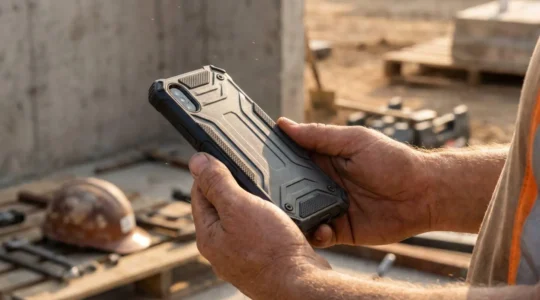
Ruggedized Bumper Cases: Which Protection Level Do You Need for Outdoor Work?
Contrary to marketing, “military-grade” doesn’t guarantee your phone will survive a job site. Most “drop tests” are marketing fluff without standardized context like height, surface, and angle. Thick, sealed cases can cause your phone’s battery to dangerously overheat during GPS…
Read more
Wireless Heavy-Duty Headsets: How to Hear Client Calls Clearly on a Noisy Building Site
The key to clear calls on a noisy site isn’t just noise cancellation; it’s a complete auditory safety system that protects your hearing while ensuring perfect clarity. Effective noise blocking requires a hybrid approach: passive isolation for sharp sounds and…
Read more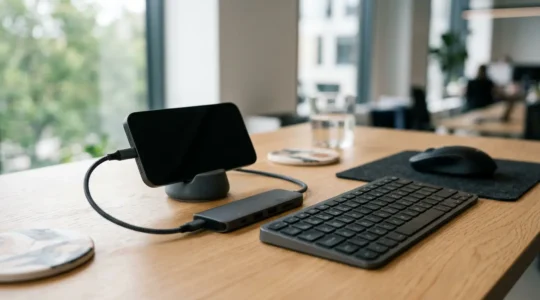
Expanding Utility Through Specialized Peripherals: How to Turn Your Mobile into a Workstation?
Transforming your phone into a true workstation isn’t about buying more gadgets—it’s about strategically eliminating productivity friction with minimal, reliable gear. Prioritize connection reliability over raw speed to avoid workflow-killing glitches and project delays. Use a physical keyboard not just…
Read more